
Your Rendering Strategy Sets Your INP Score and Your AI Visibility


Contents+
- 01What INP actually measures
- 02Hydration is the bottleneck by design
- 03Three strategies, two different problems
- Client-side hydration ships the penalty by default
- ISR fixes delivery, not hydration
- Islands hydrate only what moves
- 04The same choice decides what AI engines can quote
- 05Where to start if a rebuild isn't on the table
Headless stacks built on Next.js, Nuxt, or Astro promise clean content APIs and fast deploys. Many of them ship a hidden tax. The browser receives a thin HTML shell, downloads a large JavaScript bundle, and rebuilds the page on the user's device. While that bundle parses and executes, the main thread is busy, taps and clicks queue up, and Interaction to Next Paint (INP) climbs into failing territory.
The same architecture decision controls a second outcome most performance teams never look at. AI crawlers feeding ChatGPT, Claude, and Perplexity read raw HTML and largely skip JavaScript execution, so a client-rendered page that frustrates users also reads as near-empty to the systems deciding which sources to cite. One rendering choice, two visibility bills.
What INP actually measures
INP replaced First Input Delay as a Core Web Vital in March 2024. It tracks every interaction across the full page visit (clicks, taps, key presses), measures each one from input to the next visual frame, and reports roughly the worst of them. Google evaluates it at the 75th percentile of real Chrome user sessions, not in your lab.
| INP at the 75th percentile | Rating (web.dev) |
|---|---|
| 200 ms or less | Good |
| 201 to 500 ms | Needs improvement |
| Over 500 ms | Poor |
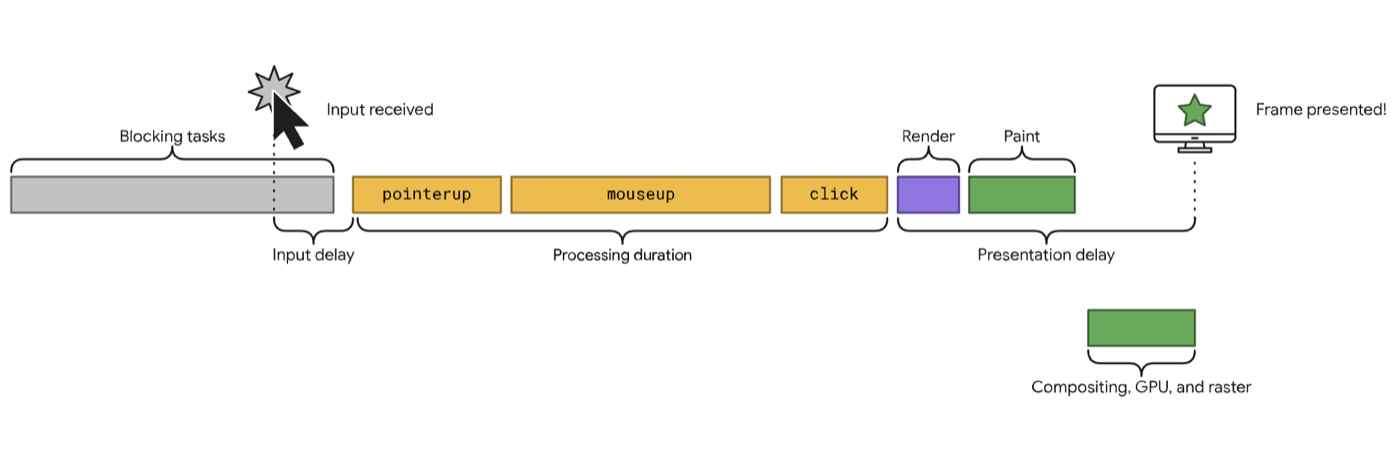
Each interaction breaks into input delay, processing time, and presentation delay. Hydration attacks the first slice. A long task parsing your bundle means the click handler hasn't even attached yet, so the browser sits on the event. The user experiences a dead button.
One caution on framing. Core Web Vitals are a ranking signal, and a modest one. The reason to fix INP is that dead buttons lose users, and the reason to fix it at the architecture level is that everything else is patching.
Hydration is the bottleneck by design
Client-side hydration re-runs your component tree in the browser to attach interactivity to server-sent markup. The work scales with the size of the tree, so the more components a page has, the longer the main thread blocks. Any task over 50 ms gets flagged as a long task, and hydration on a content-heavy page routinely produces tasks several times that.
This is why INP problems on decoupled sites resist the usual fixes. Image compression doesn't touch it. A faster CDN doesn't touch it. The cost lives in JavaScript execution, and only shipping less JavaScript, or deferring it, moves the number.
Three strategies, two different problems
The comparison usually gets presented as a single ladder from bad to good. It's more useful to separate two problems that get conflated. Delivery (how fast finished HTML reaches the user and the crawler) and hydration cost (how much JavaScript must execute before the page responds).
| Strategy | JS shipped by default | INP risk | What an AI crawler receives |
|---|---|---|---|
| Client-side hydration (CSH) | Full bundle | High | Thin shell, little extractable content |
| Incremental Static Regeneration (ISR) | Framework runtime plus page bundle | Moderate | Complete HTML |
| Islands architecture | Near zero | Low | Complete HTML |
Client-side hydration ships the penalty by default
A standard single-page app renders almost nothing on the server. Beyond the INP cost, the raw HTML often contains no article text, no product specs, nothing for an embedding model to retrieve. Vercel's crawler study (December 2024) found the major AI crawlers fetch pages without executing JavaScript, so whatever isn't in that first response mostly doesn't exist for them. For a marketing site or a content footprint of any size, this architecture concedes both scores at once.
ISR fixes delivery, not hydration
Incremental Static Regeneration pre-builds pages and serves them as static HTML from the edge, regenerating in the background on an interval you set. Time to first byte drops, the crawler gets complete markup, and content updates don't require a full rebuild.
```jsx
// app/blog/[slug]/page.jsx (Next.js App Router)
export const revalidate = 3600; // regenerate at most once per hour

export default async function Post({ params }) {
  const post = await getPost(params.slug);
  return <Article post={post} />;
}
```
The honest caveat, and the one the typical comparison table skips. An ISR page in Next.js still hydrates on the client. Delivery is solved; the bundle still executes. If your INP failures come from hydration cost rather than slow HTML, ISR alone won't fix them. Pair it with React Server Components so most of the tree never ships to the browser, and isolate the genuinely interactive pieces.
```jsx
// Keep heavy client-only widgets out of the critical path
import dynamic from 'next/dynamic';
const ChatWidget = dynamic(() => import('./ChatWidget'), { ssr: false });
```
Islands hydrate only what moves
Islands architecture inverts the default. The page is static HTML, and interactivity is opted into per component. Astro ships zero JavaScript unless a component asks for it, and the `client:*` directives control when each island wakes up.
```astro
---
import Reviews from '../components/Reviews.astro';
import PriceCalculator from '../components/PriceCalculator.jsx';
---
<Reviews />
<!-- Static HTML. No JS shipped for this component. -->

<PriceCalculator client:visible />
<!-- Hydrates only when it scrolls into view. -->
```
`client:idle` defers hydration until the main thread is free, and `client:visible` skips it entirely for components the user never scrolls to. For a documentation site, a publisher, or a marketing footprint with isolated interactive regions (a calculator, a search box, a comparison widget), this is the strongest INP profile available. The trade-off appears when interactivity is dense and shared, like a dashboard, where dozens of islands passing state start to recreate the bundle they were meant to avoid.
The same choice decides what AI engines can quote
Retrieval systems split your pages into passages and embed whatever text they can extract. A server-rendered page gives them the full article. A client-rendered page gives them a div and a script tag. The teams treating rendering strategy as a pure performance question are setting their AI citation ceiling without knowing it.
This is where the two disciplines stop being separate jobs. The fix for a failing INP score (ship finished HTML, hydrate selectively) is the same fix that makes content retrievable by answer engines. One migration, both bills paid.
Where to start if a rebuild isn't on the table
Full replatforming to islands is rarely the first move for a team already on Next.js or Nuxt. The sequence that works runs smallest-risk first.
1. Move static sections to Server Components so their JavaScript never ships.
2. Convert client-fetched pages to ISR where content changes on a schedule rather than per request.
3. Load below-the-fold widgets with dynamic imports, third-party scripts last.
4. Re-measure INP from field data after each step, not lab runs. CrUX decides your rating.
A 30-minute check tells you where you stand today. View source on your three highest-value pages and search for your own headline in the raw HTML. If it isn't there, neither your users' first interaction nor the AI crawlers are getting what you think you published. The free AI Visibility Audit on this site runs that raw-versus-rendered comparison for you.
See where your brand stands in AI answers today, benchmarked against your competitors, no pitch required.

How to Use the Google Search Console MCP in Your SEO Process (6 Real Workflows)
Six Google Search Console MCP workflows we run on search.agency, each with the exact prompt, the tool it calls and the real output it returned.
Read post →
How DOKU Became the Most Visible Payment Gateway in Indonesian Search
DOKU was the better-known brand and the worse-ranked one. Eight months of technical repair and four content pillars later, it holds more Top 3 rankings than any payment gateway in the market.
Read post →
How to Fix Crawled and Discovered Currently Not Indexed Pages in Search Console
Google found these pages, sometimes even read them, and still left them out of the index. How to tell the two Search Console statuses apart, and which fixes actually move them.
Read post →