
Screaming Frog MCP: The Crawler Finally Speaks Claude

Contents+
- 01What MCP Actually Is, in One Paragraph
- 02Setting It Up: My Walkthrough
- 03Which Version You Need, and the Error Everyone Hits
- 04What It Actually Unlocks
- Crawl and Audit Basics, Without Touching the UI
- AI-Powered Analysis Layered On Top
- Content and Embeddings Work
- Real Agency Workflows
- 05Leveraging AI for Deeper Content & Semantic Analysis
- 06What It Does Not Do, Yet
- 07Integrating MCP into Agency Workflows & Client Reporting
Screaming Frog MCP is a Model Context Protocol server built into the SEO Spider that lets an AI assistant run and read crawls in plain English, instead of you driving the interface by hand. It arrived with SEO Spider version 24, buried under the usual quality of life updates, and it is the feature most of the SEO community had been quietly waiting for. The crawler I have been driving with mouse clicks for over a decade can now be controlled from inside Claude, LM Studio, Cursor, or any other MCP-aware AI client.
I installed it on the day of release, connected it to both Claude Cowork and Claude Desktop, and ran a fresh crawl of search.agency through it. Below is the firsthand walkthrough, plus the four capability angles I think will reshape how technical SEO teams work day to day.
What MCP Actually Is, in One Paragraph
MCP is a protocol that lets AI assistants discover and call external tools. Once a server is registered, the assistant can list its capabilities, decide which to invoke, and feed the results back into your conversation. With Screaming Frog v24.0, the crawler itself becomes one of those tools. You ask Claude to run a crawl, and Claude tells the SEO Spider to do it, then reads the output back to you. No CLI flags, no exports, no spreadsheets in between.
Setting It Up: My Walkthrough
Here is exactly what I did on a Mac. The Windows and Linux paths are similar.
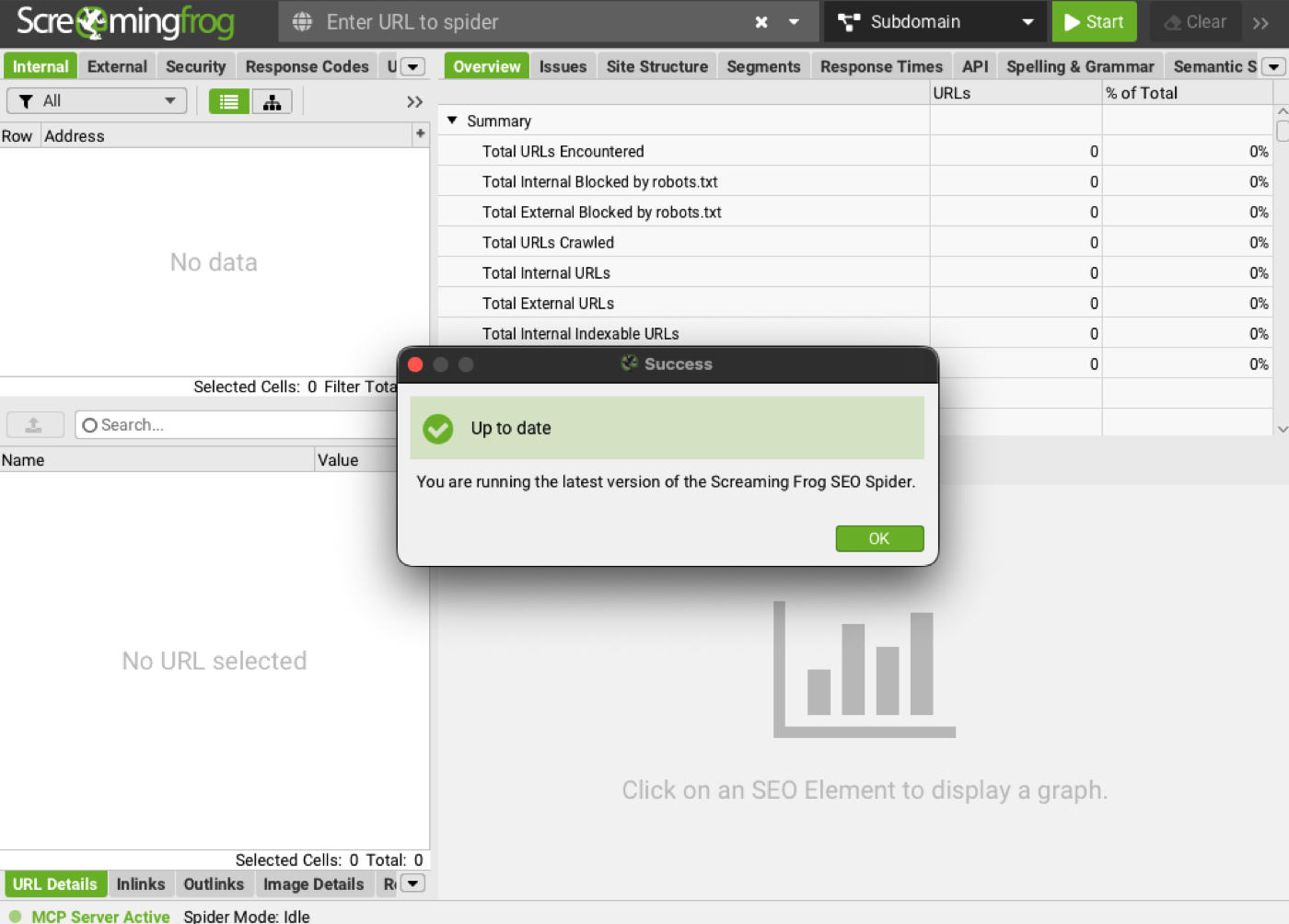
Step 1. Update Screaming Frog to version 24.1. Open the SEO Spider, go to Help and check for updates. Screaming Frog's FAQ is explicit that the MCP server launched in 24.1 — on 24.0 the extension throws an error, and on anything below that the MCP option will not exist at all. Fresh installers for Windows, macOS Apple Silicon, macOS Intel, and the various Linux flavours are all on the Screaming Frog download page.
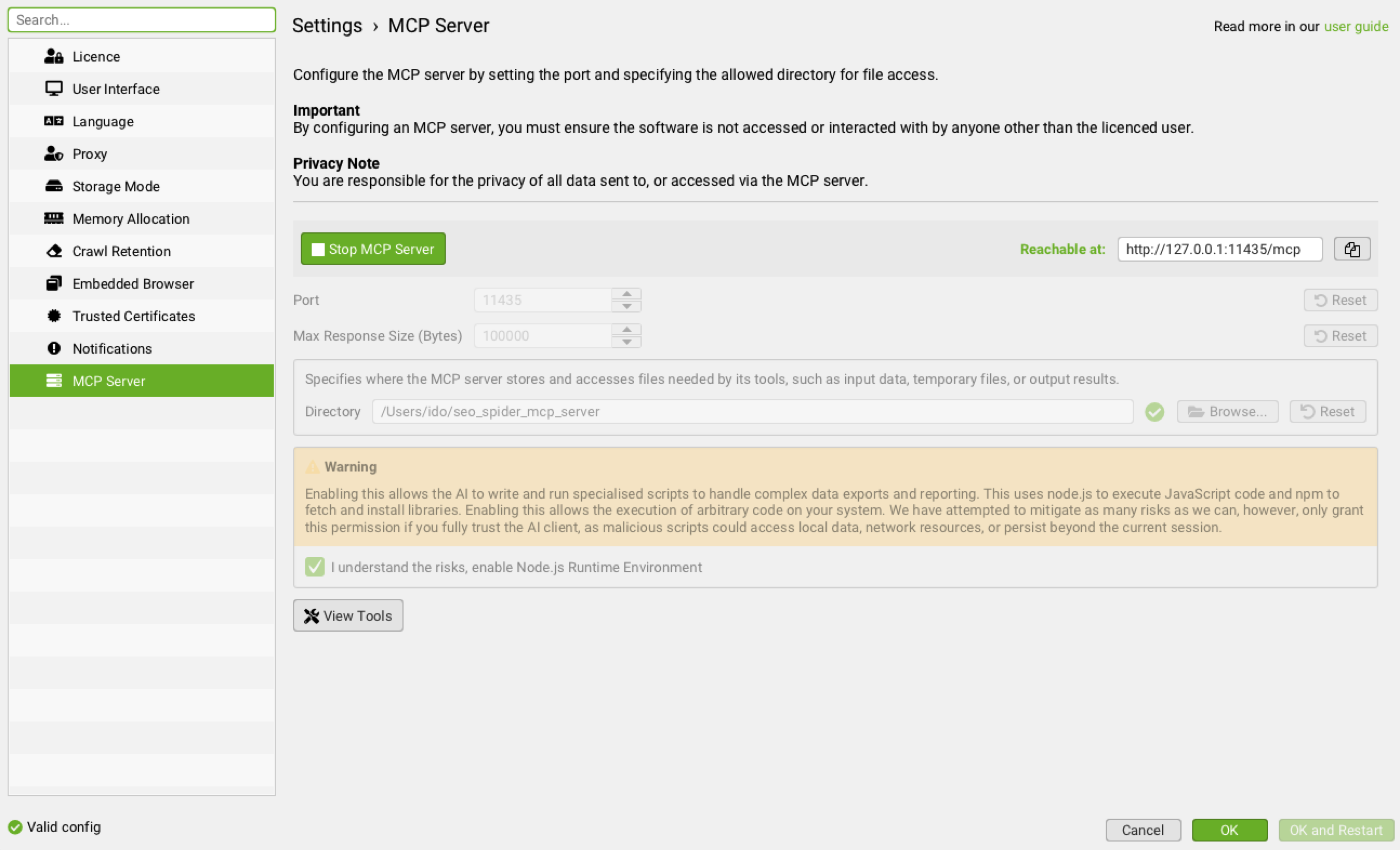
Step 2. Enable the MCP server inside Screaming Frog. The full settings live in the official MCP server documentation. In short, you give the server a base directory it is allowed to read and write inside. Mine is set to `/Users/***/seo_spider_mcp_server`. Every export, screenshot, or generated script the assistant produces will land in that folder. Keep it scoped. Do not point it at your home directory.
Step 3. Register the server in your AI client. This is where Claude Cowork and Claude Desktop diverge slightly.
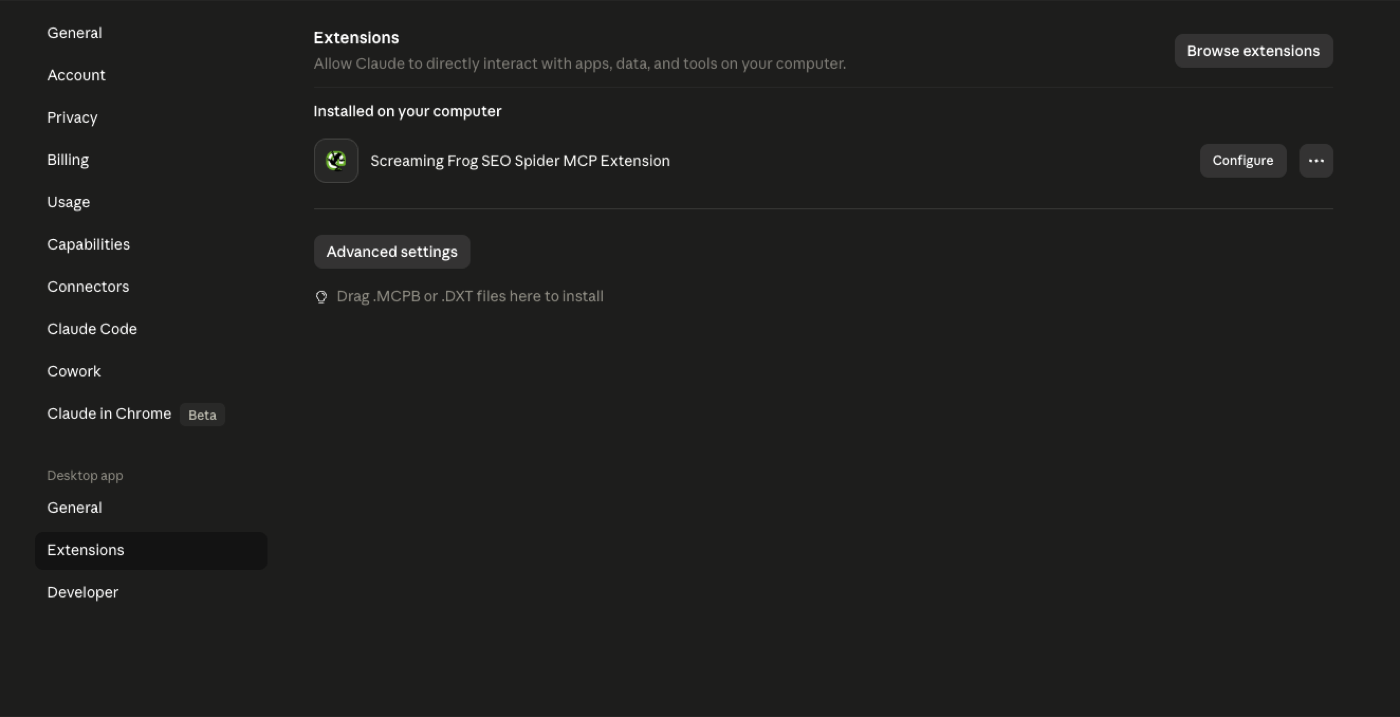
For Claude Cowork, open settings, find the Extensions panel, and add the Screaming Frog SEO Spider MCP extension. Cowork handles the connection wiring for you. After the green light, type something simple like list my recent crawls in chat. If Claude lists them, you are connected.
For Claude Desktop, you edit the `claude_desktop_config.json` file and add the Screaming Frog MCP entry by hand. The exact server command and arguments are in the Screaming Frog docs above. Restart the app once, and the new tools appear in the lower toolbar.
Step 4. Smoke test it. I asked Claude to call `sf_list_allowed_base_directory` and then `sf_list_crawls`. Within five seconds it confirmed the base path and pulled my last five projects, including the search.agency crawl from version 23.3 in April and the version 24.0 crawl from this evening. That is when it clicked. The crawler was no longer a separate app I tab into. It was just another voice in the conversation.
Which Version You Need, and the Error Everyone Hits
This is the part that wastes the most time, so it is worth stating plainly. Screaming Frog's own FAQ says the SEO Spider MCP launched in version 24.1. Install the Claude extension against 24.0 and you get an Unexpected non-whitespace character error, because 24.0 shipped a bug affecting some non-English languages.
That error has three documented causes:
You are running 24.0. Update to 24.1.
You installed the MCP extension before installing 24.1. The software has to come first.
The SEO Spider is not in its default install location. The extension file (
spider-mcp.mcpb) assumes it is, so either reinstall to the default path or edit the.mcpbto point at the real one.
If you have already hit it, the clean recovery is to uninstall the extension (Settings, then Extensions, then Uninstall), quit Claude fully — via the tray icon or task manager, since closing the window leaves it running — install 24.1, and then add the extension again.
What It Actually Unlocks
I tested four angles. Each one matters for a different reason.
1. Crawl and Audit Basics, Without Touching the UI
The simplest, and the first thing you should try, is letting Claude run a crawl end to end. Crawl search.agency, then summarise the top issues. What used to require opening the app, configuring spider settings, waiting, then clicking through the Overview tab now happens in one prompt. Claude can call `sf_crawl`, poll `sf_crawl_progress`, and once complete, pull from the full library of built-in reports. The available report list is enormous. Crawl Overview, Issues Overview, Hreflang validation, PageSpeed opportunities, Structured Data errors, Accessibility violations, Cookie summaries, and dozens more.
For weekly recurring audits, this collapses a half hour of clicking into a single sentence.
2. AI-Powered Analysis Layered On Top
The crawl is just raw data. The point of running it through Claude is what comes after.
Once the data is in the conversation, Claude can prioritise issues by impact, group similar problems together, and write the actual remediation tickets. I tested a prompt along the lines of take the latest search.agency crawl, identify the three most damaging technical issues, and draft a ticket for each in Jira format. The output was useful enough to send to a developer without much rewriting. That is the real shift. The audit and the action plan now happen in the same window.
3. Content and Embeddings Work
This is the angle that surprised me most. Screaming Frog v24.0 exposes the bulk page content export and the embeddings export through MCP. That means you can ask Claude to pull the body content of every URL in a crawl, generate embeddings, and cluster the pages by semantic similarity. In one workflow. Without writing a line of Python.
For content teams, this is a serious shortcut. You can spot near-duplicate articles competing for the same query, find cannibalisation across your blog, or map out which old pieces should be consolidated. The kind of work that used to require a custom script and an afternoon now fits inside a Claude conversation.
4. Real Agency Workflows
The four use cases I am already moving into production at Search Agency:
A weekly client health check that runs the crawl, compares it against last week, and outputs a one-page summary with the deltas highlighted. A competitor teardown where Claude crawls a competitor site, exports key on-page elements, and side-by-sides them against the client. A pre-launch QA pass that crawls a staging environment and flags any new redirects, broken links, or missing tags before they hit production. An internal linking audit that pulls the link graph, runs Claude analysis on link equity flow, and recommends specific new internal links to add.
None of these are theoretical. I am running variations of all four this week.
Practical Use Cases: Automating Core SEO Tasks with MCP
Beyond basic setup, the true power of Screaming Frog's MCP integration with Claude lies in its ability to automate and streamline many core SEO tasks that previously required manual intervention or complex scripting. For businesses transitioning to a more digital-first approach, understanding these practical applications is key to realizing immediate value. Imagine tasks like comprehensive site audits, content gap analysis, or even competitor analysis being initiated and summarized through simple natural language commands.
For instance, you can instruct Claude to perform a crawl focused on specific parameters – perhaps identifying all pages with missing meta descriptions or duplicate H1 tags across a large, technical website. Claude, leveraging the MCP, communicates this directive to Screaming Frog, executes the crawl, and then processes the raw output. Instead of sifting through spreadsheets, you receive a concise summary of issues, prioritized by severity, directly within your AI chat interface. This not only speeds up the identification of critical problems but also allows for quicker decision-making, which is invaluable for businesses needing to act decisively on digital improvements. This level of automation means less time on data extraction and more time on strategic implementation, directly addressing the pain point of overwhelming data for businesses without dedicated in-house digital teams. It bridges the gap between complex SEO tools and actionable insights, making advanced technical SEO accessible.
Leveraging AI for Deeper Content & Semantic Analysis
One of the most exciting advancements enabled by MCP is the ability for AI, specifically Claude, to perform sophisticated content and semantic analysis directly on crawl data. This goes beyond identifying simple on-page elements. For businesses looking to refine their online messaging and ensure their technical services resonate with their target audience, this capability is a game-changer. Claude can now ingest the content of entire websites, or specific sections, as crawled by Screaming Frog, and apply its advanced language understanding to uncover deeper insights.
Consider a scenario where you need to assess the semantic relevance of your product pages to specific industry keywords. You can ask Claude to crawl a subset of pages, extract their content, and then analyze it for keyword density, topic modeling, or even sentiment. This means identifying if your content truly speaks to the intent behind B2B search queries, or if there are missed opportunities to highlight your unique value propositions. For a 'Legacy Modernizer', this translates into a clearer understanding of how their established expertise is being perceived online and what adjustments are needed to attract new B2B clients. Claude can even help identify content gaps based on competitor analysis or suggest improvements for existing content to better align with search intent, effectively acting as an AI-powered content strategist working directly with your crawl data. This allows for rapid iteration and optimization of online content, ensuring it's both technically sound and semantically rich.
What It Does Not Do, Yet
A few caveats worth setting expectations on.
Not every Screaming Frog feature is wired up through MCP today. Screaming Frog has said the surface area will expand based on user feedback, so the first few months will reward people who file requests for the specific commands they want exposed. The MCP also depends on the SEO Spider being open and running on your machine. This is not cloud-hosted. If you close the app, the tools go offline. And finally, the larger the crawl, the more careful you should be about which exports you ask Claude to load into context. Pulling the full content of 10,000 pages into a chat is not the right move.
For SEO teams, this update changes the gradient of the work. The technical audit moves from a sequence of clicks into a conversation. The reporting moves from a deck of screenshots into a live discussion with someone who has already read the data. The competitor analysis, the content cluster, the link audit, all of it shifts from a multi-day project into something you can finish over coffee.
Screaming Frog has been the workhorse of technical SEO for years. Wiring it directly into an AI assistant turns it into something closer to a thinking partner. If you have not updated yet, do it today, point Claude at it, and see how much of your usual workflow disappears.
Integrating MCP into Agency Workflows & Client Reporting
For agencies and in-house teams, the integration of Screaming Frog MCP with Claude streamlines not just execution but also reporting and client communication. The ability to generate concise, AI-summarized reports from complex crawl data directly addresses the need for clear, actionable insights without overwhelming stakeholders with raw data. Imagine presenting a client, particularly a 'Legacy Modernizer' who values clear ROI, with a natural language summary of their website's technical health, complete with prioritized recommendations and estimated impact, all generated automatically after a crawl.
This system allows for more frequent and efficient technical audits, meaning issues can be identified and addressed proactively rather than reactively. Claude can be prompted to compare historical crawl data with current data, highlighting new issues or confirming the resolution of old ones. This level of automated analysis and reporting frees up valuable consultant time, allowing them to focus on strategic thinking and client relationships rather than data manipulation. It also democratizes access to complex SEO data, making it understandable for non-technical clients and facilitating buy-in for necessary website improvements. By integrating this into existing workflows, agencies can demonstrate a higher level of efficiency, transparency, and strategic value, reinforcing trust and partnership with their clients, which is a key goal for those seeking long-term guidance.
Resources
See where your brand stands in AI answers today, benchmarked against your competitors, no pitch required.

How DOKU Became the Most Visible Payment Gateway in Indonesian Search
DOKU was the better-known brand and the worse-ranked one. Eight months of technical repair and four content pillars later, it holds more Top 3 rankings than any payment gateway in the market.
Read post →
How to Fix Crawled and Discovered Currently Not Indexed Pages in Search Console
Google found these pages, sometimes even read them, and still left them out of the index. How to tell the two Search Console statuses apart, and which fixes actually move them.
Read post →
How to Run ChatGPT Ads in Indonesia
ChatGPT ads are now open to Indonesian advertisers. We set up two campaigns in Ads Manager and documented every screen, from the first ad preview to the pixel and context hints.
Read post →