
How I got rpsg.co.id to 100/100/100/100 on Lighthouse, and which fixes actually moved the score

Contents+
- 01Why I cared
- 02The fixes that actually moved the score
- Inline all CSS
- Fix color contrast
- Fix heading hierarchy
- Self-host the fonts
- Inline JSON-LD structured data
- Content Security Policy
- 03The fixes that do not move the needle
- Minifying JavaScript by switching to terser
- Preloading fonts
- Reducing "unused CSS"
- What this proves about modern static sites
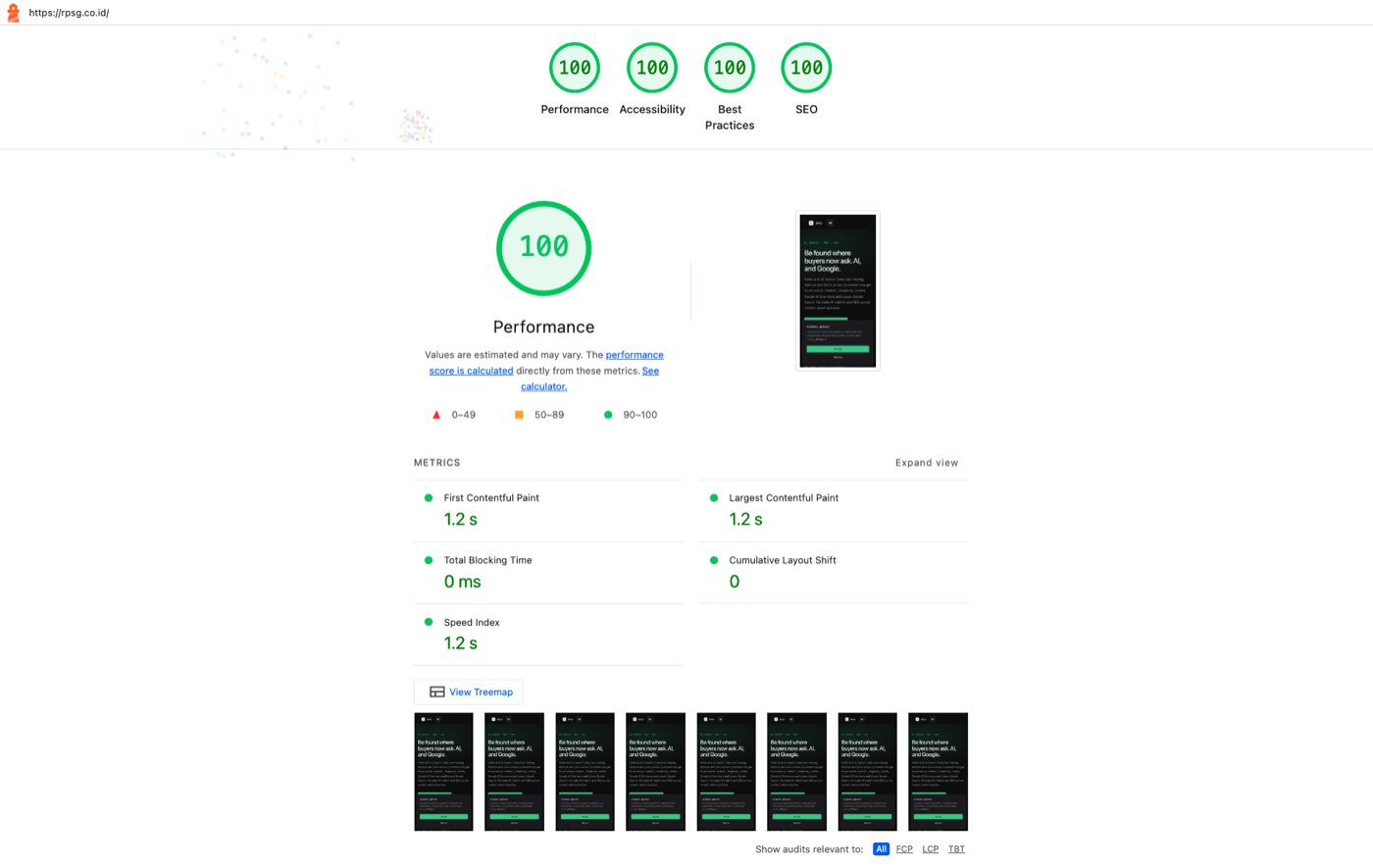
Most Lighthouse advice tells you to chase 100 across the board. Half of it does not move the score and most of it does not move the user experience. Here is what actually got rpsg.co.id from 88/95/85/100 to 100/100/100/100, and what I would skip if I were doing this again.
Why I cared
I am an AI Search consultant. My site has to demonstrate the work, not just claim it. If a founder lands here from an AI Overview and the site takes three seconds to render, the credibility argument is dead before the first sentence. Lighthouse is not the goal. A fast, accessible, well-structured site is the goal. The score is just the proxy.
The fixes that actually moved the score
Inline all CSS
This was the single biggest lever. Lighthouse flagged "render-blocking CSS" with an estimated 350ms LCP savings. The default pattern in most static site builders ships CSS as an external file linked from the head. The browser parses the HTML, hits the link, fetches the CSS, parses it, then renders. That HTTP round trip is the render block.
The fix is to inline all CSS into the HTML head. No external CSS request, no waterfall. HTML pages get larger (mine went from around 12KB to 80KB per page), but over HTTP/2 with brotli compression the actual transfer is around 12 to 15KB and there is no second request.
js
build: { inlineStylesheets: 'always' }
That is it. One config line. LCP dropped from around 1.5s to 1.2s.
The cost is that HTML files do not cache as efficiently across pages, since each page's CSS is shipped fresh. For a low to medium traffic site, that does not matter. For a site doing millions of visits a day, you would extract critical CSS more carefully. Pick the option that matches your scale.
Fix color contrast
The design system originally had a "muted text" color at #6E6E76 against the #0A0A0B background. That is about 4.0:1 contrast. WCAG AA requires 4.5:1 for small text. So every uppercase label, eyebrow, and meta line was technically failing.
The fix is to bump the muted text color to #8E8E96, which is around 5.0:1. Still visibly dimmer than the secondary text color (#A0A0A8), so the visual hierarchy holds. But now it passes AA for small text.
Worth noting: the design system file actually documented this as a 4.0:1 color with a comment that said "meta only" (implying it was intentionally sub-AA for the lowest-priority text). That is a fair design call, but Lighthouse does not accept "I meant to do that" as an answer. If you are going to ship sub-AA contrast on purpose, never use that token on text that needs to be readable.
Fix heading hierarchy
My footer used `<h5>` tags for column titles ("Work with me", "Site", "Elsewhere"). The page above them only went h1, h2, h3. Skipping straight to h5 is a real accessibility issue. Screen readers use the hierarchy to navigate.
The fix is to change the footer column titles to `<h2>` (since the footer is a landmark, its heading sequence restarts there). Added a `.footer__col-title` class to preserve the visual styling.
This is the kind of issue that costs nothing to fix and immediately bumps the accessibility score by 5 to 10 points. No reason to ship a site with broken heading hierarchy.
Self-host the fonts
Before, Google Fonts loaded via `<link>` from fonts.googleapis.com. That is a third-party DNS lookup, TLS handshake, and a synchronous CSS request before the fonts can even start downloading. Lighthouse called it a "render-blocking request" and a privacy concern.
After, I installed `@fontsource/geist-sans`, `@fontsource/geist-mono`, and `@fontsource/newsreader`. Fontsource packages ship the WOFF2 files and the `@font-face` declarations as npm packages. Astro bundles them with hashed filenames. The fonts now ship from the same origin, no DNS lookup, no third-party connection.
This also fixed a CSP question. I did not have to add fonts.googleapis.com to my Content Security Policy because the fonts are not coming from there anymore.
Inline JSON-LD structured data
This one is not about score. It is about being cited. Every page on the site emits Person, Organization, and WebSite schema. Blog posts add Article and (if they are tutorials) HowTo. The glossary page emits DefinedTerm. The work-with-me page wraps the visible FAQ in FAQPage schema.
AI engines lift this data verbatim. The bet is that structured data does more for citation rates than any other technical thing on a content site.
Lighthouse does not reward this directly, but the SEO category rewards having structured data present. More importantly, the actual outcome (being cited) is what matters.
Content Security Policy
Lighthouse's Best Practices category flags missing CSP. The minimum viable fix is one header that scopes what scripts, styles, fonts, and form posts the page can use.
Mine allows self for everything, plus the specific third parties I use: googletagmanager.com for analytics, api.web3forms.com for the contact form, and sanity.io for the content CDN. Everything else is blocked. Form submissions are constrained to specific domains.
This does not make the site faster, but it does make it harder to compromise via injected scripts, which is what Lighthouse is checking for.
The fixes that do not move the needle
Minifying JavaScript by switching to terser
Saved 2KB on the hoisted bundle. The browser does not care. Lighthouse barely notices. I did it because it was a one-line config change, but if I had to do work for it, I would not have bothered.
Preloading fonts
Tempting in theory: tell the browser to start fetching critical fonts in parallel with the CSS parse. In practice, fontsource defaults to `font-display: swap`, which means text renders with the fallback font immediately and the swap happens when the font is loaded. There is no blocking. The preload hint would save the user maybe 50ms of swap delay. Not worth the build-time complexity.
Reducing "unused CSS"
After inlining all CSS, Lighthouse flagged 24KB of "unused CSS" on the About page. Technically true: the About page does not use the form styles, hero styles, or pagination styles. But once CSS is inlined, there is no second request to defer. The 24KB is shipping anyway in the HTML. Extracting them into separate scoped files for each page would help, but only marginally, and adds maintenance complexity.
I extracted the biggest single block (form styles, around 3KB) because they really were only on one page. The rest stayed in the global stylesheet.
What this proves about modern static sites
You can hit perfect Lighthouse scores on a content site without a build pipeline that requires a small team to maintain. The hard things turn out not to be hard. Modern static site builders (Astro in my case) handle most of the work for you. The performance metric that matters most is render blocking. Accessibility issues are usually a handful of CSS color fixes and one heading. SEO score is mostly about structured data and meta tags, which are templating questions.
What is not solved by tooling: the design decisions. Contrast, heading hierarchy, content structure. Those need someone to think about them.
If you are an SEO consultant and your own site is not this fast, you are walking into your sales calls with a credibility problem. Same for accessibility consultants on inaccessible sites. The fix is not a six-month rebuild. It is an afternoon of careful work in the right places.
If you want help applying this to your own site, book a 30-minute call and I will tell you which of these fixes apply, and which do not.
See where your brand stands in AI answers today, benchmarked against your competitors, no pitch required.

How to Use the Google Search Console MCP in Your SEO Process (6 Real Workflows)
Six Google Search Console MCP workflows we run on search.agency, each with the exact prompt, the tool it calls and the real output it returned.
Read post →
How DOKU Became the Most Visible Payment Gateway in Indonesian Search
DOKU was the better-known brand and the worse-ranked one. Eight months of technical repair and four content pillars later, it holds more Top 3 rankings than any payment gateway in the market.
Read post →
How to Fix Crawled and Discovered Currently Not Indexed Pages in Search Console
Google found these pages, sometimes even read them, and still left them out of the index. How to tell the two Search Console statuses apart, and which fixes actually move them.
Read post →