
How to Use ChatGPT for SEO (5 Workflows With Prompts)

Contents+
- 01What has changed in ChatGPT since 2023
- 02Analyze Search Console data with ChatGPT
- 03Find pages that are losing impressions
- 04Chart performance by page category
- 05Run a content gap analysis against a competitor
- 06Review an article against Google's helpful content guidance
- 07Check ChatGPT's work before you act on it
ChatGPT can take a lot of routine work out of SEO, from finding patterns in Google Search Console exports to comparing your article with a competitor's and checking it against Google's content guidance. We use it for five tasks in particular, and each one has a prompt you can copy and a screenshot of the result.
We first published these workflows in 2023, when they needed ChatGPT Plus, the Code Interpreter beta, and a browsing plugin called WebPilot. ChatGPT has changed a great deal since then, so each workflow now reflects how the task works today. The screenshots come from our original 2023 runs, so the interface in them looks older, but the prompts and the outputs still hold.
What has changed in ChatGPT since 2023
Three changes affect these workflows. Code Interpreter became ChatGPT's built-in data analysis, which reads spreadsheets and CSV files, writes and runs Python, and produces tables and charts. You no longer switch it on separately, although what is available still varies by plan and workspace settings.
OpenAI also retired the plugin system in 2024, so WebPilot and other browsing plugins no longer exist. ChatGPT now has its own web search, launched in October 2024 and opened to everyone in February 2025, which can read public pages and link to its sources. Integrations now run through apps and connectors instead of plugins.
The third change is ChatGPT's role in search itself. It is now a place where buyers ask for recommendations, which makes it a channel to optimize for as well as a tool to work with. Our guide on getting cited by AI search engines covers that side.
Analyze Search Console data with ChatGPT
ChatGPT's data analysis is useful for turning a Search Console export into a short list of things to act on. Export the Pages report from the Performance section of Google Search Console as a CSV file, upload it to ChatGPT, and use this prompt.
You are an SEO expert. Analyze this data from the Google Search Console performance report and share the five most actionable insights from it.
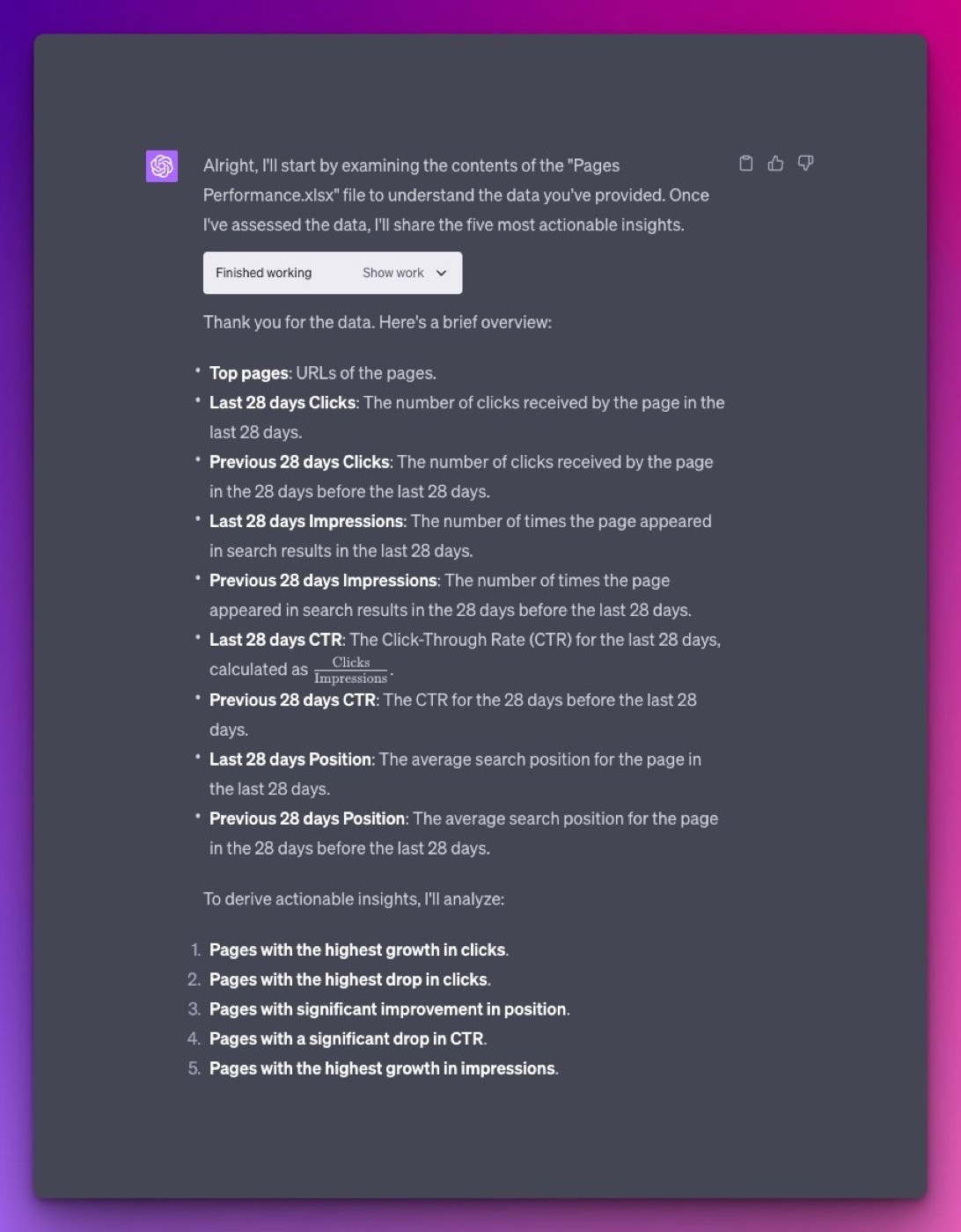
ChatGPT first explains how it reads each column, which lets you check that it understood the data correctly before trusting its conclusions. Export at least three months of data so the patterns are meaningful, and include the date range in your prompt.
Find pages that are losing impressions
Broad insights are a starting point. A more specific prompt finds the pages that need attention, such as pages losing impressions while their click-through rate and position stay steady, which usually points to falling search demand or a change in the results page. Export two periods and upload both files, or use the comparison view in Search Console before exporting.
Share the five pages that lost the most impressions while their CTR and average position stayed almost the same.
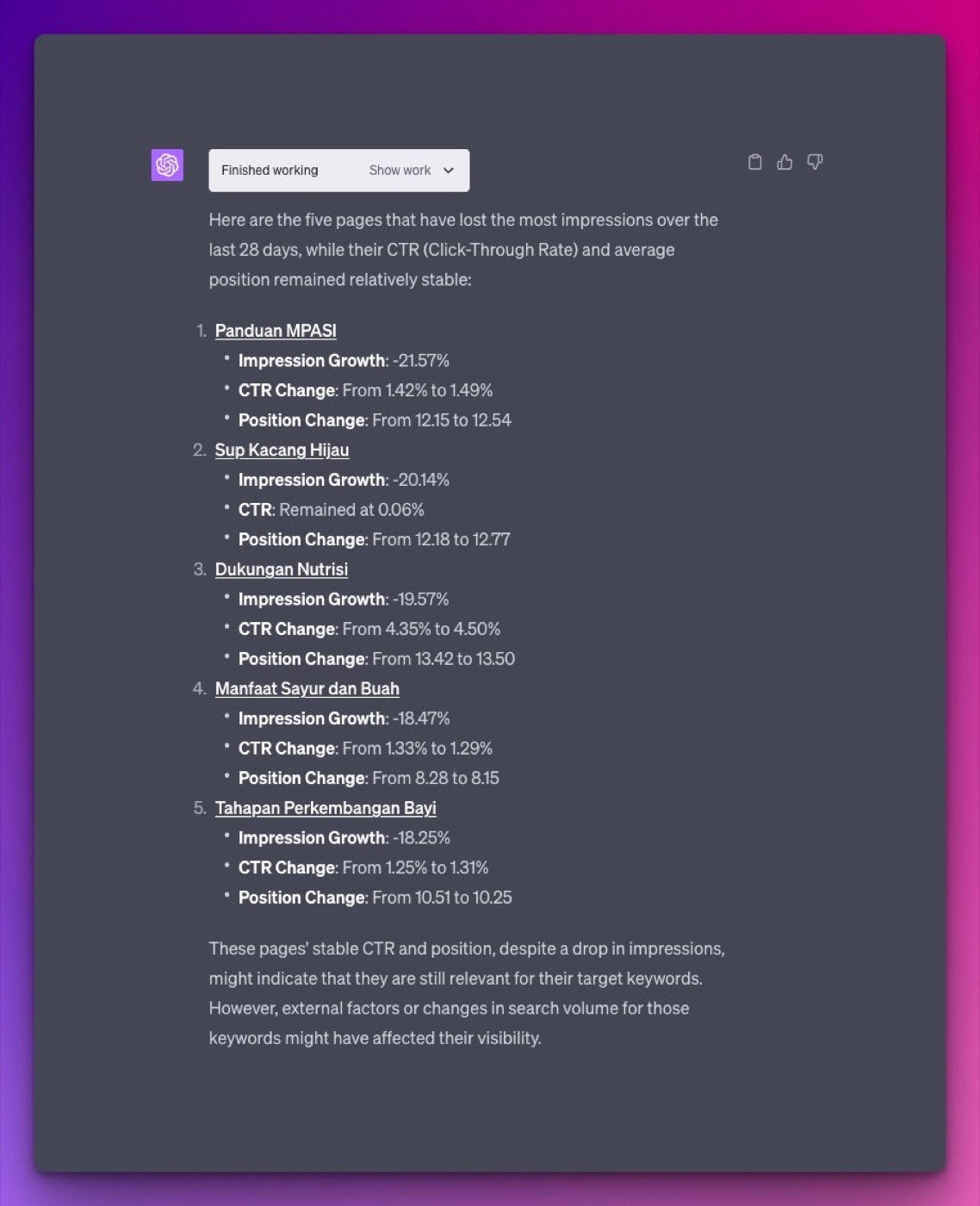
Adjust the conditions to match the question you want answered. Asking for pages where position held but clicks fell, for example, often surfaces queries where an AI Overview or a new results feature has started taking clicks.
Chart performance by page category
ChatGPT can also group URLs into categories and chart how each group performs. Give it the rules for each category in plain language, as in this example from a site with articles, recipes, and product pages.
Using this URL categorization, show a bar graph of category performance (clicks, impressions, CTR, and position).
URLs containing "/milestone/" are Articles.
URLs containing "/resep/" are Recipes.
URLs containing "/produk/" are Products.
All other URLs are Others.
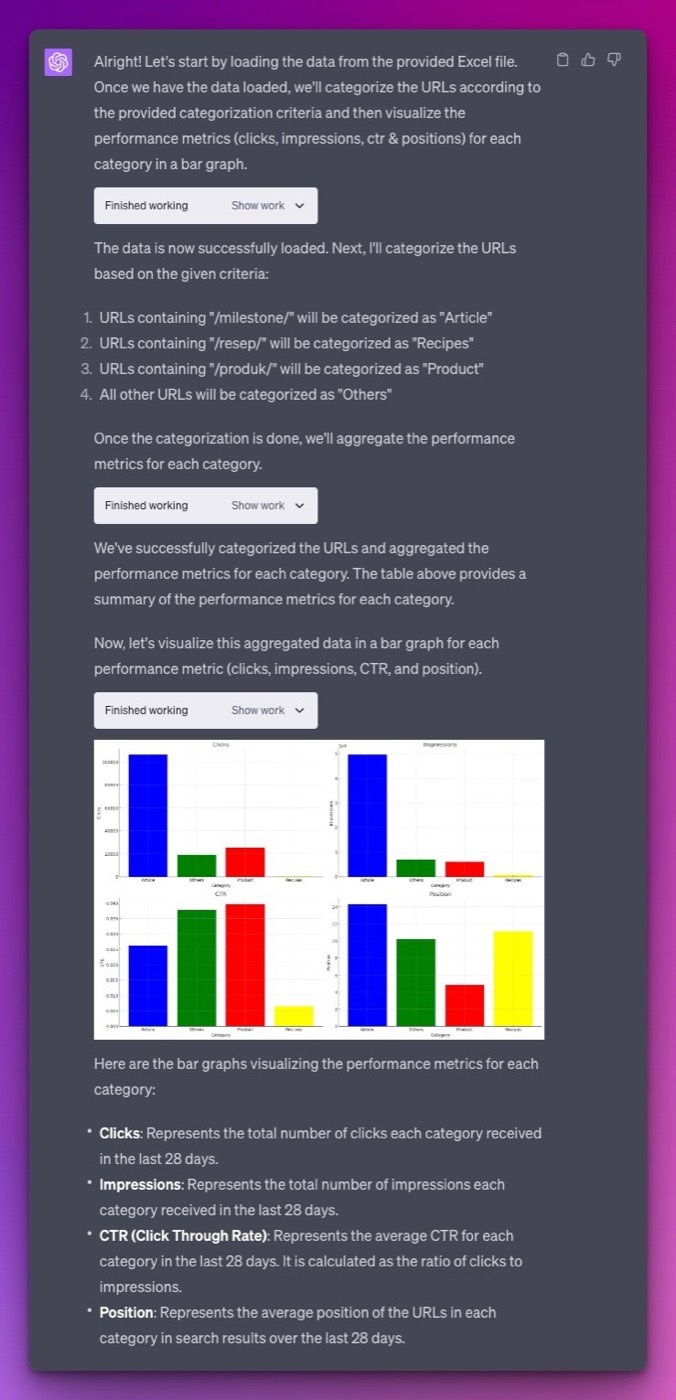
Change the URL patterns to match your own site structure. The same approach works for blog categories, product lines, or language folders, and you can ask ChatGPT for the underlying table to reuse in your own reports.
Run a content gap analysis against a competitor
ChatGPT can compare your article with a competitor's that ranks better and list what yours is missing. With web search built in, it can read both pages directly. In our 2023 example, we compared an Allianz Indonesia article on early signs of pregnancy with Halodoc's pregnancy hub, which had stronger visibility for the topic.
You are an SEO expert specializing in content marketing.
Article A: [your article URL]
Article B: [competitor article URL]Article B has better search visibility for [topic]. Analyze both articles and list the improvements Article A needs to compete with Article B.
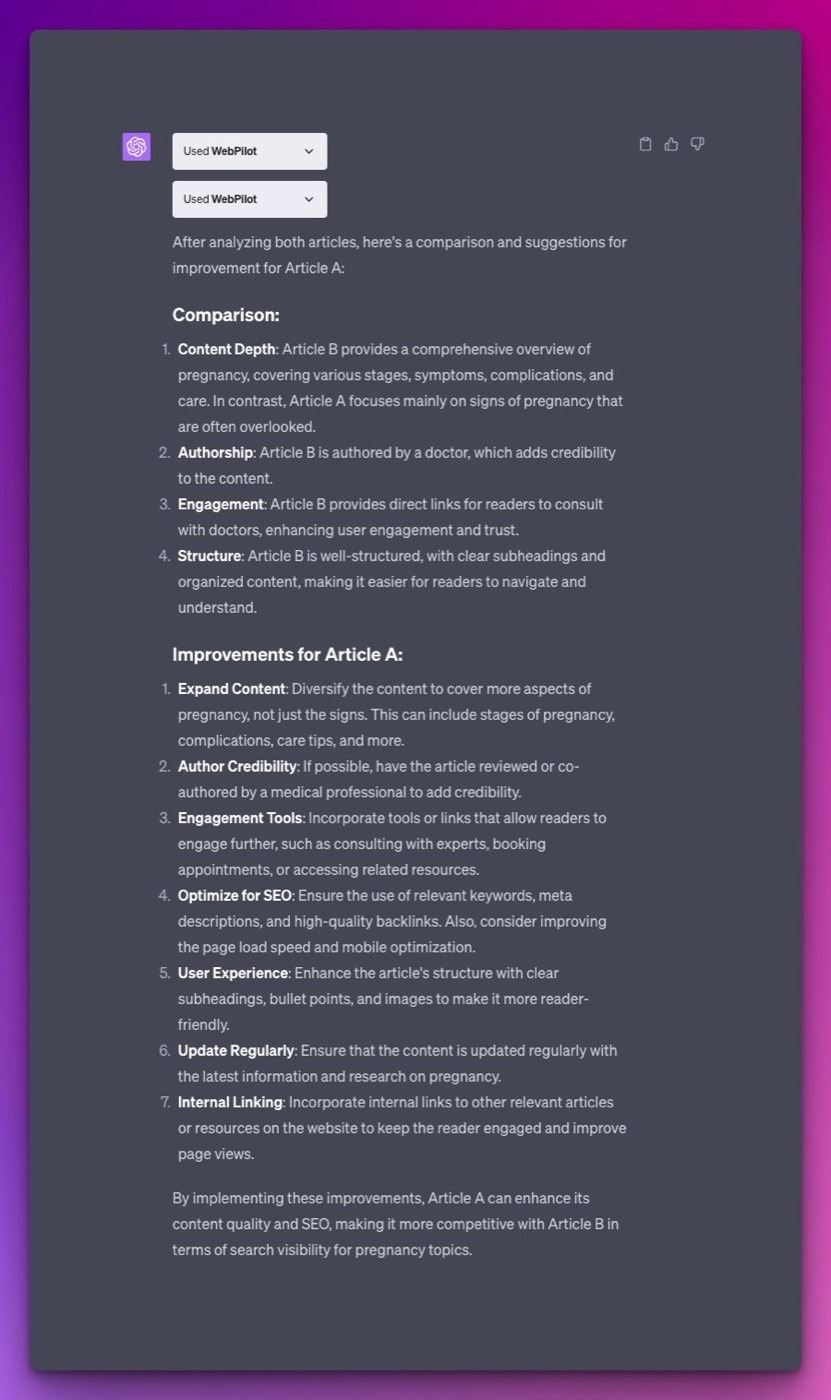
Some sites block AI crawlers, and ChatGPT will say so or summarize from search snippets instead of the full page. If that happens, paste the text of each article into the chat. Check the suggestions against the live search results for your keyword, since the competitor's advantage may come from links or brand strength that no content change will close.
Review an article against Google's helpful content guidance
You can also ask ChatGPT to review an article against a specific set of guidelines. This example uses Google's guidance on creating helpful, reliable, people-first content.
You are an expert in pregnancy-related topics with extensive knowledge of SEO.
Read and understand Google's guidelines at https://developers.google.com/search/docs/fundamentals/creating-helpful-content.
Using those guidelines, list the improvements this article needs to meet them: [your article URL]
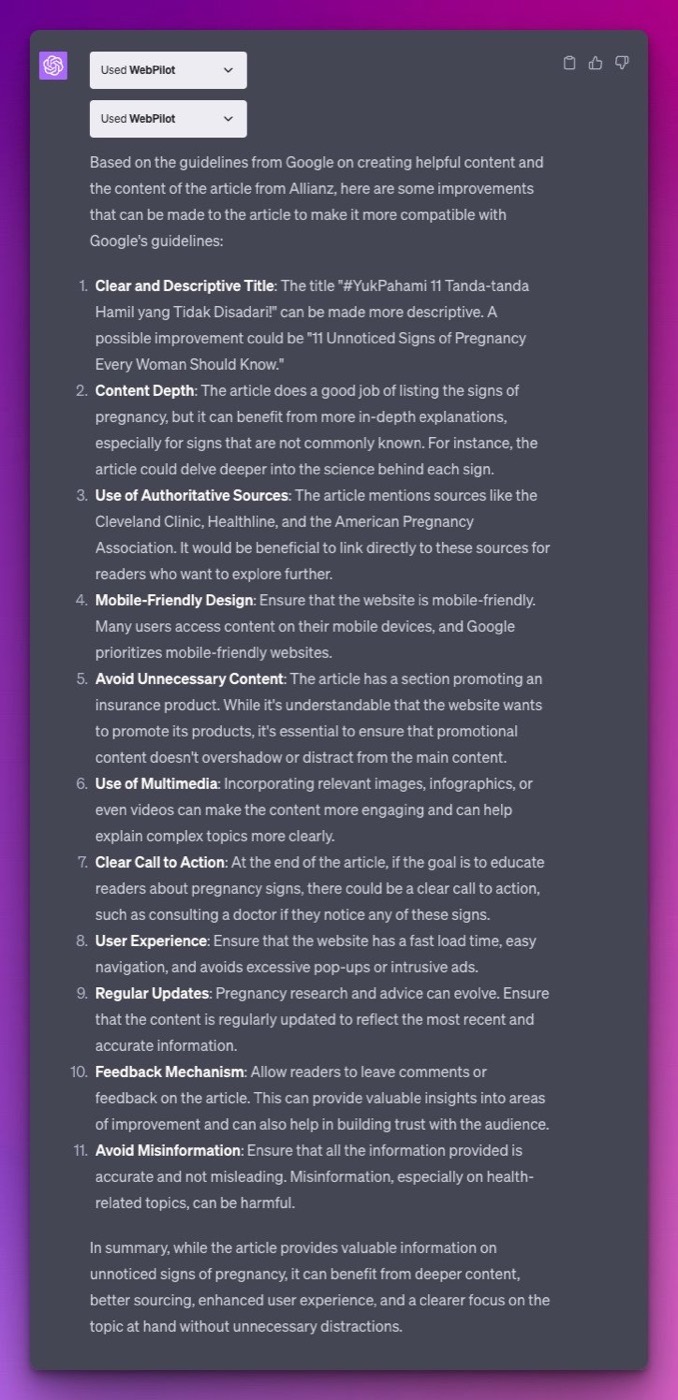
Replace the expertise in the first line with the subject of your article, because it shapes the kind of feedback you get. The same structure works with other documents, such as your brand's style guide or a client's content brief.
Check ChatGPT's work before you act on it
ChatGPT can misread a column, miscount rows, or state a conclusion the data does not support. For data analysis, ask it to show the code and the table behind each insight, and spot-check a few numbers against the original export. OpenAI notes that large or poorly structured files may be analyzed incompletely, so split large exports or remove columns you do not need.
Treat its content suggestions as a review from a capable assistant that still needs your judgment. It cannot see your rankings, backlinks, or conversion data unless you provide them, so weigh each recommendation against what you know about the page and its audience.
Think about privacy before uploading. Search Console exports and client documents can contain sensitive business data, so check your workspace's data controls and your client agreements first. If you want to go deeper on AI in SEO work, our SEO Fighter Bootcamp includes a full session on the topic.
See where your brand stands in AI answers today, benchmarked against your competitors, no pitch required.
How to Get More From Your Semrush Subscription With AI Agents
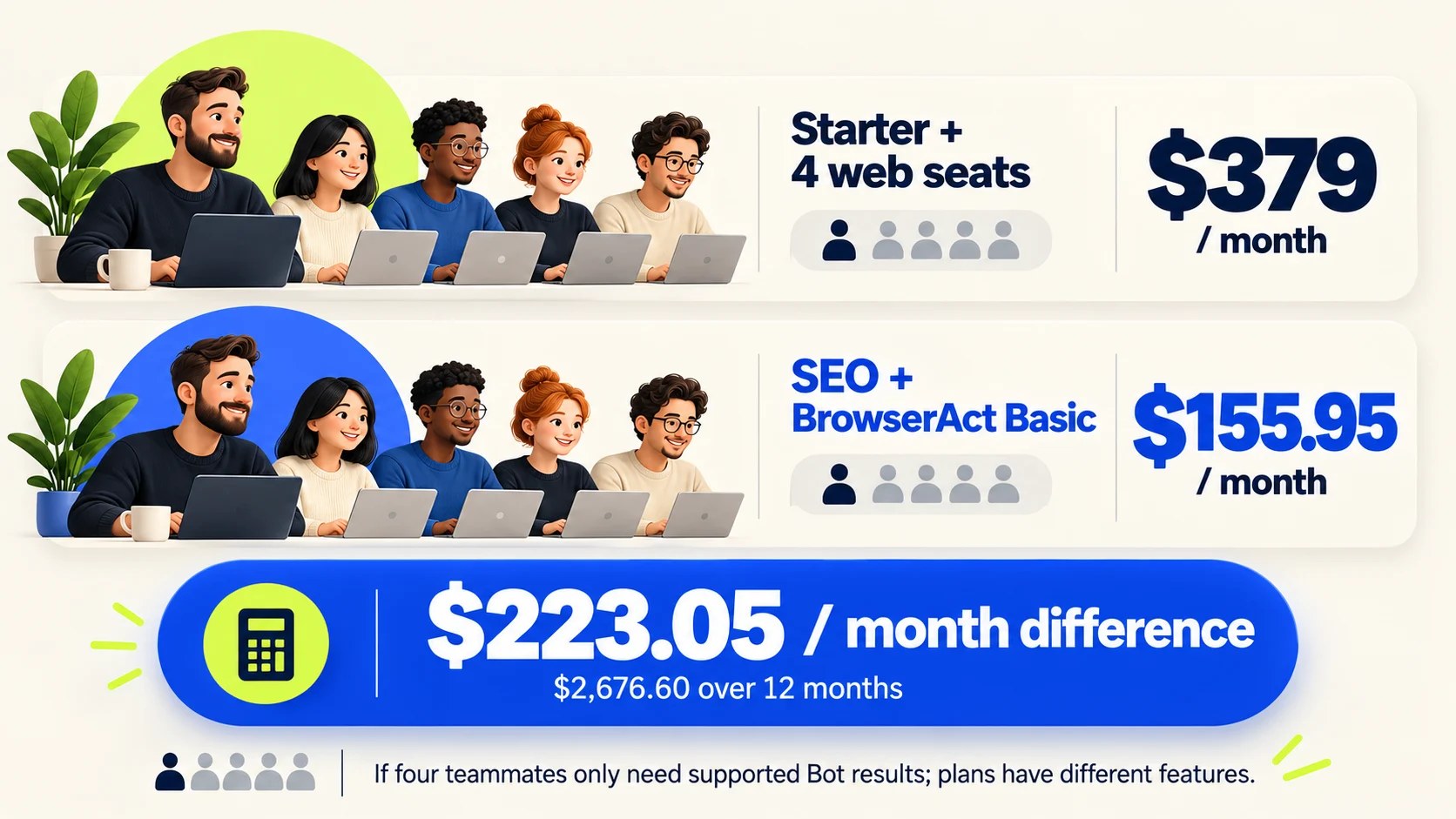
BrowserAct's walkthrough of one Semrush keyword check run through MCP and a five-person team budget comparison.
Read post →
How to Use the Google Search Console MCP in Your SEO Process (6 Real Workflows)
Six Google Search Console MCP workflows we run on search.agency, each with the exact prompt, the tool it calls and the real output it returned.
Read post →
How DOKU Became the Most Visible Payment Gateway in Indonesian Search
DOKU was the better-known brand and the worse-ranked one. Eight months of technical repair and four content pillars later, it holds more Top 3 rankings than any payment gateway in the market.
Read post →