
What Screaming Frog Can Really Do Once You Connect It to Claude

Contents+
- 01Getting Started: Essential Screaming Frog Setups for Any Website
- 02Crawl Once, Then Interrogate It
- 03Indexability and Crawl Architecture
- Untangling Canonical Chains and Conflicts
- Building the Real Indexability Matrix
- Mapping Redirect Chains and Loops
- Checking Pagination Integrity
- 04International
- Validating Hreflang Return Links and Consistency
- 05Rendering and Discovery
- Diffing Raw HTML Against the Rendered DOM
- Auditing Uncrawlable Links
- Hunting Orphan Pages
- 06Structured Data and SERP
- Validating Structured Data at Scale
- Tuning Titles and Meta at Scale
- 07Content Intelligence
- Custom Extraction at Scale
- Clustering Near-Duplicates and Cannibalisation
- Detecting Thin and Low-Value Content
- 08Beyond the Crawl: Leveraging Screaming Frog for Content Audits and Strategy
- 09Performance and Monitoring
- Surfacing PageSpeed Opportunities at Scale
- Monitoring Crawl-Over-Crawl Regressions
- 10Combining Sources With Semrush and Search Console
- Striking Distance Optimisation
- Content Decay Detection
- Cannibalisation Confirmed With Ranking Data
- Keyword Gap to Content Brief
- Link Equity Versus Demand Mismatch
- 11Where This Goes Next
- 12Quantifying Value: Measuring the ROI of Screaming Frog SEO Insights
Most Screaming Frog tutorials stop at broken links and missing meta descriptions. That is the warm-up. The tool earns its license fee on the layer underneath, the canonical logic, the rendering gaps, the international signals, and above all the moment you stop treating the crawl as the answer and start treating it as one input among several. On enterprise sites, the real wins live where crawl data meets Semrush and Search Console.
In my last post, I walked through connecting Screaming Frog v24.0 to Claude with the new MCP. This is the follow-up I promised, expanded. Twenty workflows I actually run, each driven from a Claude conversation rather than a sequence of menu clicks. The first fifteen get the most out of the crawl itself. The last five go further, where Claude joins the crawl to Semrush and Search Console to answer questions no single tool can.
Every workflow below follows the same shape. What it does, why it matters, the exact prompt I type into Claude, and how to read what comes back. Swap search.agency and the competitor placeholder for your own and they are ready to run.
Getting Started: Essential Screaming Frog Setups for Any Website
While the power of Screaming Frog truly shines when integrated with AI like Claude for advanced analysis, many businesses, especially those new to comprehensive technical SEO, might first need a foundational understanding of its core capabilities. This section is designed to guide you through the essential initial steps and configurations that apply to virtually any website, laying the groundwork for more sophisticated workflows.
Before diving into complex data interrogations, ensure your Screaming Frog setup is optimized for basic but critical audits. Start by configuring the 'Configuration > Spider' settings to include or exclude specific URL types (e.g., images, CSS, JavaScript) based on your immediate audit goals. For most initial technical SEO audits, you'll want to ensure JavaScript rendering is enabled ('Configuration > Spider > Rendering') if your site heavily relies on client-side content. Pay close attention to 'Configuration > API Access' settings, as this is where you'll eventually connect to tools like Google Analytics, Search Console, and potentially Claude via custom integrations for richer datasets.
For businesses transitioning to digital, a common first step is identifying broken links, missing meta descriptions, or duplicate content. Screaming Frog makes this straightforward. After a crawl, navigate to the 'Response Codes' tab for broken links (4xx errors) and redirects (3xx errors). Check 'Page Titles' and 'Meta Description' tabs for missing or duplicate elements that can impact your search visibility. These basic checks are often the quickest wins for improving site health and a clear demonstration of Screaming Frog's immediate value.
Crawl Once, Then Interrogate It
Here is the part most people get wrong. You do not re-crawl for every question. You run one properly configured crawl, and then every workflow below is a follow-up prompt against that stored crawl. Re-crawling for each analysis wastes hours and, on large sites, real money. Crawl once, interrogate many times.
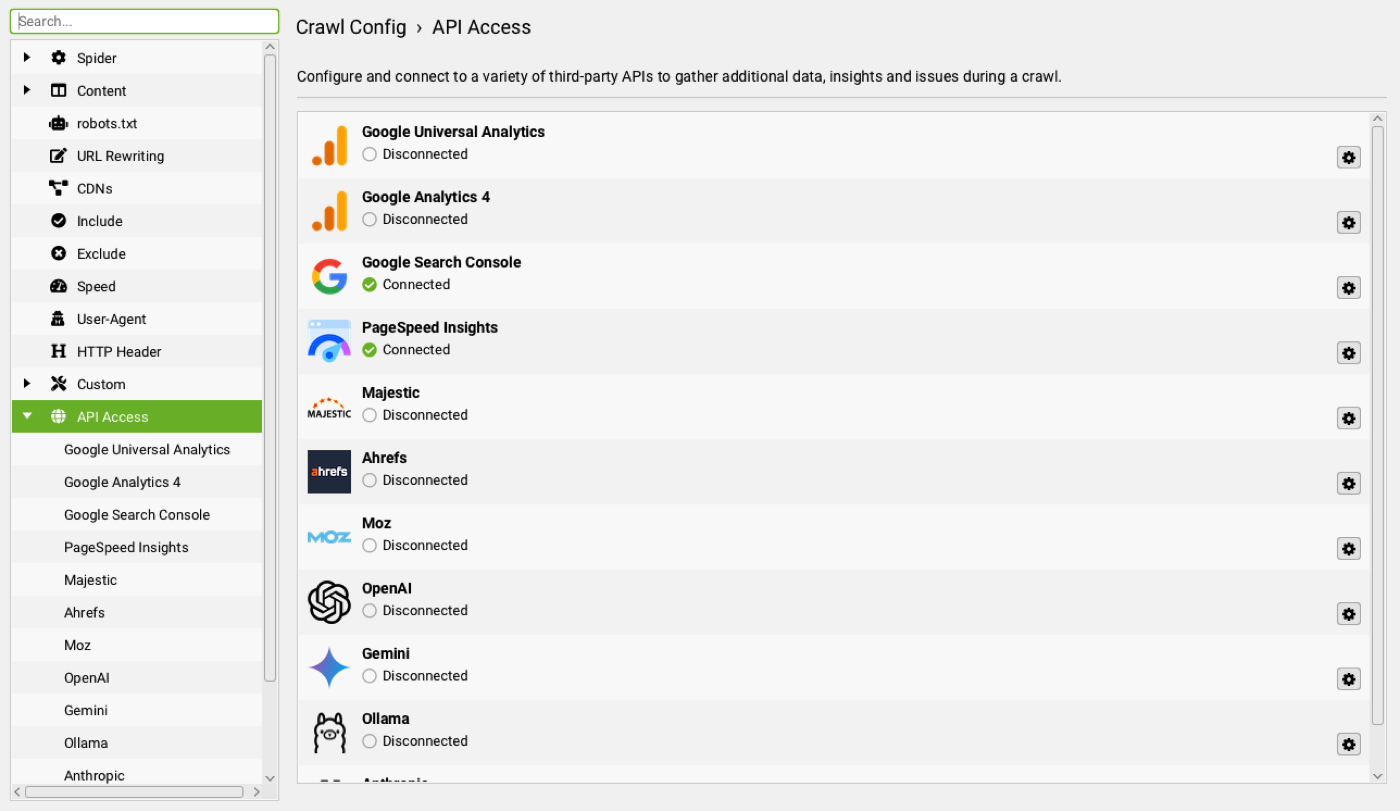 API Access" loading="lazy">
 The catch is that several of these workflows depend on settings and integrations that have to be on at crawl time. JavaScript rendering, link storage, structured data validation, custom extraction selectors, an AI provider for embeddings, and the API connections to PageSpeed Insights and Search Console cannot be applied retroactively to a finished crawl. So I turn them all on up front and run a single comprehensive audit crawl. Semrush is the exception, because Screaming Frog has no native Semrush integration, so its data comes through the separate Semrush MCP that Claude calls directly whenever a workflow needs it.
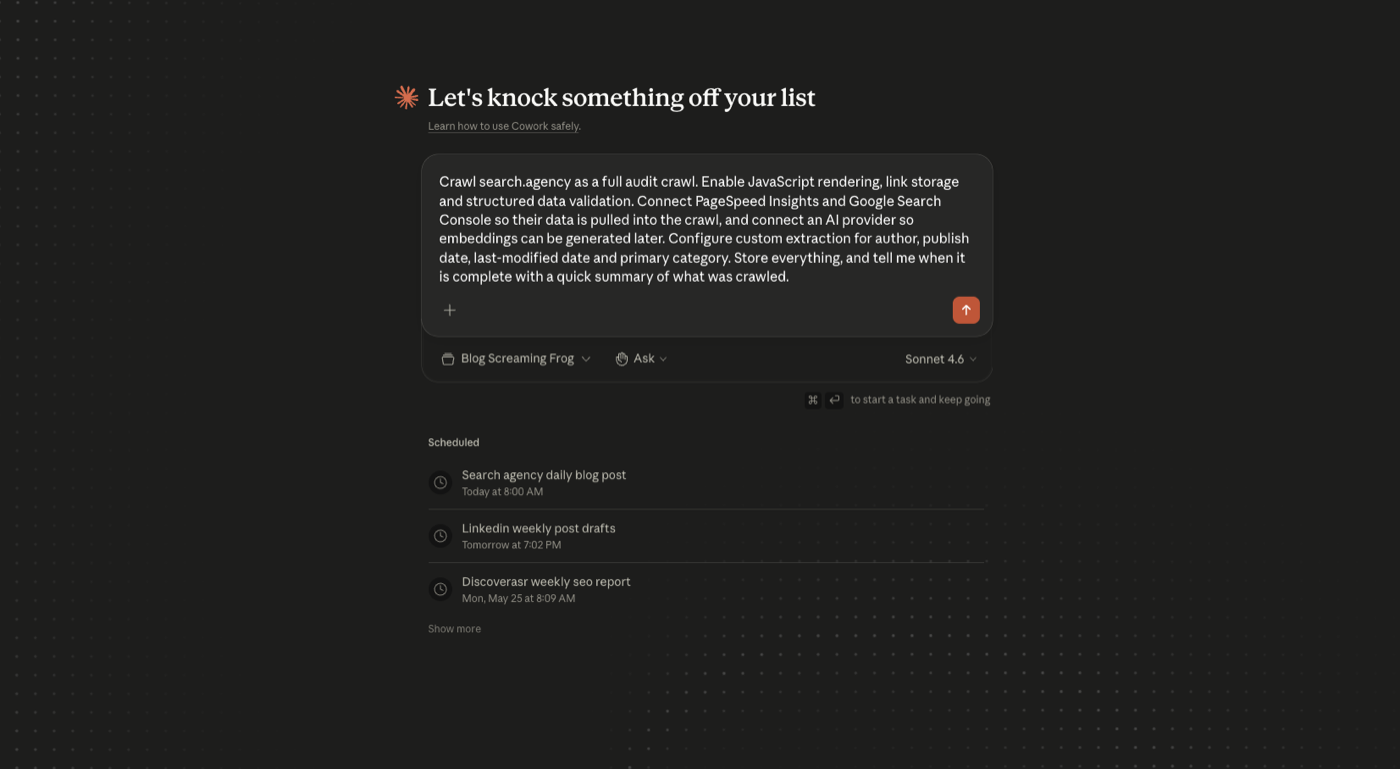
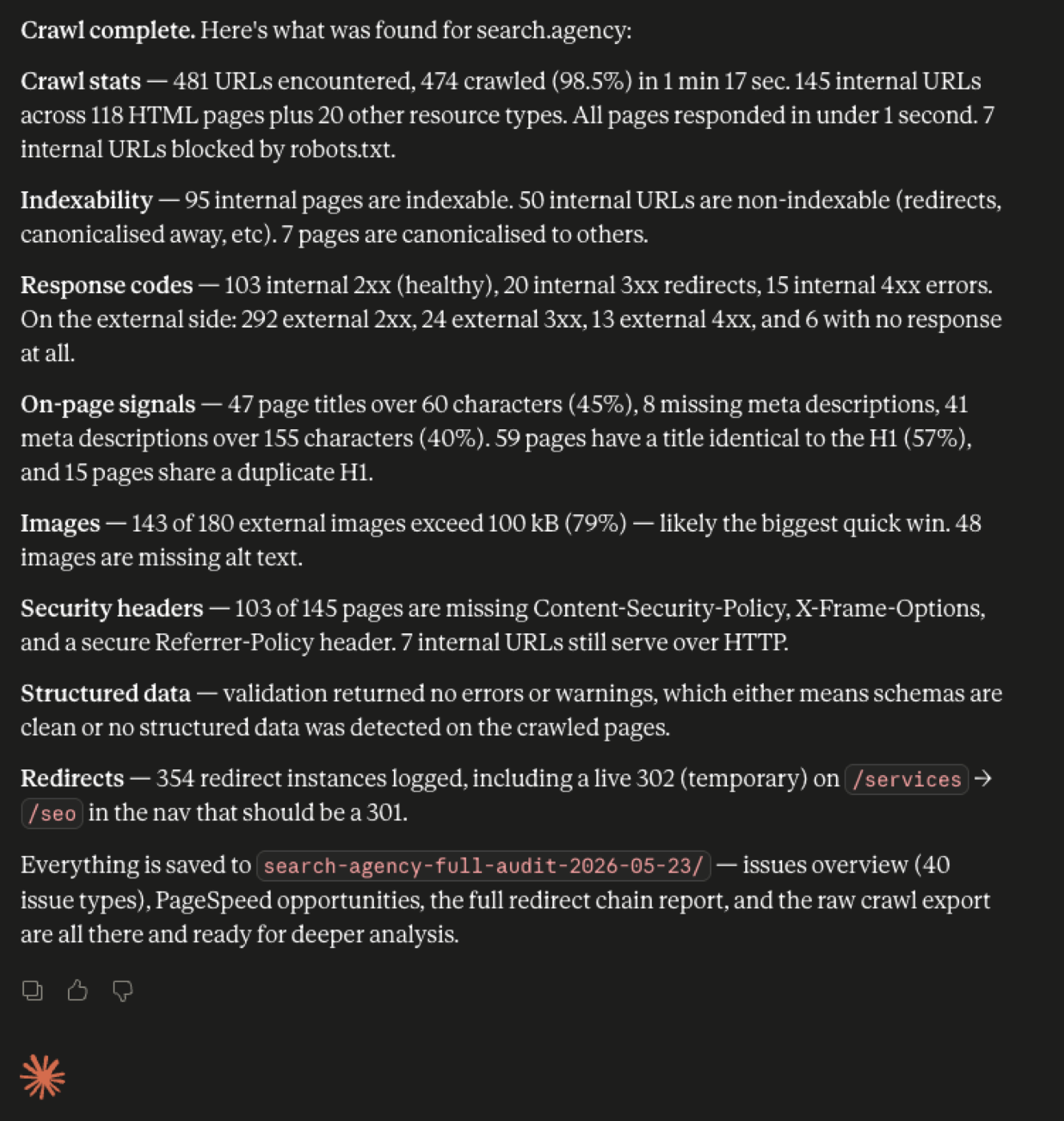
Crawl search.agency as a full audit crawl. Enable JavaScript rendering, link storage and structured data validation. Connect PageSpeed Insights and Google Search Console so their data is pulled into the crawl, and connect an AI provider so embeddings can be generated later. Configure custom extraction for author, publish date, last-modified date and primary category. Store everything, and tell me when it is complete with a quick summary of what was crawled.
Indexability and Crawl Architecture
1. Untangling Canonical Chains and Conflicts
What it does. Surfaces the canonicals that point somewhere broken, a redirect, a noindex page, a 404, or another canonicalised URL.
Why it matters. A single misrouted canonical can quietly deindex a revenue page. The self-referencing ones are fine. The dangerous ones chain until Google ignores the signal and picks its own canonical, usually not the one you wanted.
Using the audit crawl, find every URL where the canonical points to a non-200 page, a redirected URL, a noindexed page, or another canonicalised URL. Give me a table grouped by failure type, with the source URL and the canonical target.
Reading the output. Read it target-first. If a canonical points to a 301, the fix is repointing it to the final destination, not chasing the redirect. The self-referencing canonicals drop away and you are left with the genuine conflicts to action.
2. Building the Real Indexability Matrix
What it does. Combines every indexability signal for each page into one view, status code, canonical, meta robots, robots.txt, and sitemap presence.
Why it matters. Indexability is never one flag. A page can return 200, sit in the sitemap, and still be excluded because a noindex tag and a canonical and a robots rule are fighting each other. Reading any one signal alone is how teams convince themselves a page should rank while Google has already dropped it.
From the same crawl, build me an indexability matrix. For every indexable-intent page, show its indexability status, the canonical target, the meta robots directive, and whether it is blocked in robots.txt or present in the XML sitemap. Flag any page that sends contradictory signals.
Reading the output. Go straight to the contradiction list. A sitemap page carrying noindex, a page set to index but canonicalised elsewhere, a linked page disallowed in robots. Each contradiction is one decision someone needs to make.
3. Mapping Redirect Chains and Loops
What it does. Traces every multi-hop redirect from first URL to final destination, and flags loops.
Why it matters. Single redirects are fine. Chains bleed link equity, slow the crawl, and add latency users feel on mobile. Loops trap crawlers and burn crawl budget on large sites. Each hop looks correct in isolation, which is why chains hide.
Still on that crawl, map every redirect chain of two or more hops. Show me the starting URL, each hop in sequence, the final destination, and the final status code. Highlight any loops or chains that end in an error.
Reading the output. Final status code first. A three-hop chain resolving to a 200 is a tidy-up. A chain ending in a 404, or looping back on itself, is a live problem. Collapse each chain to the single corrected target Claude identifies.
4. Checking Pagination Integrity
What it does. Validates paginated sequences and flags pages that return errors, sit orphaned, or break the sequence.
Why it matters. Paginated archives, category listings and faceted sets are where crawl budget goes to die. Google has to walk the sequence cleanly to discover everything hanging off it, and the failures repeat across thousands of URLs.
From the crawl, identify all paginated URL sequences. Flag any paginated pages that return a non-200 status, any that are orphaned with no inlinks, and any sequence where the pagination appears to break. Summarise by template.
Reading the output. Work at the template level. One broken pattern usually repeats across the whole set, so a single template fix clears the entire class. You want the five patterns, not the five thousand pages.
International
5. Validating Hreflang Return Links and Consistency
What it does. Checks every hreflang cluster for missing return links, language and region mismatches, and broken targets.
Why it matters. Hreflang breaks silently. Ship the tags, the pages look fine, and months later the German site is ranking in Austria while the Austrian pages vanish. Almost always it traces to a missing return link, where page A points to B but B does not point back, so Google discards the whole cluster.
Using the crawl, validate all hreflang annotations. Show me missing return links, inconsistent language and region pairings, hreflang pointing to non-200 URLs, and any hreflang targets that are noindexed. Group the issues by the page cluster they affect.
Reading the output. Group by cluster. A single missing return link is not a project, but a market pair with two hundred broken reciprocals is. The clustered view is the only way these problems make sense across a multi-market site.
Rendering and Discovery
6. Diffing Raw HTML Against the Rendered DOM
What it does. Compares the HTML in the response against the DOM after JavaScript renders, and reports what differs.
Why it matters. If your site leans on JavaScript, the two can be different documents. Content, links, canonicals and meta tags can exist only after render, or only before it. That gap is where indexing surprises live, and a non-rendering crawl cannot see it.
The audit crawl was run with JavaScript rendering on. Using it, compare the raw HTML against the rendered DOM and tell me where they diverge. Specifically, find content, internal links, canonical tags or meta robots directives that appear in one but not the other.
Reading the output. Watch the links-only-in-rendered case. Those are pages and link equity Google may discover late or never, depending on its render budget for your site. Fix the component or template responsible.
7. Auditing Uncrawlable Links
What it does. Finds links that live in the HTML but do not follow Google's crawlable link guidance, like an href on a span or a destination that only fires on click.
Why it matters. Google may parse some of these, but it does not treat them as proper hyperlinks for passing signals, and you should never rely on them for discovery of anything important. Version 24 added detection for exactly these patterns.
Link storage was enabled for the audit crawl. From it, find all uncrawlable internal links, the span-href, div-href, javascript-onclick and similar patterns. Show me the pages they appear on and where each one is trying to point, then flag any that lead to otherwise orphaned URLs.
Reading the output. The one that matters is an uncrawlable link being the only path to a page. That is a URL effectively invisible to search, dressed up as linked. Separate those from the merely cosmetic cases.
8. Hunting Orphan Pages
What it does. Reconciles the crawl against your sitemap, Search Console and Analytics to find pages with zero internal links.
Why it matters. Orphans exist, often rank, sometimes earn revenue, but have no internal links pointing in. They survive on external links or direct traffic and erode the moment either dries up. A crawl alone cannot find them, because a crawl only follows links.
From the crawl, reconcile the crawled URLs against the XML sitemap and, if connected, Google Search Console and Analytics. Show me every URL that exists in those sources but has zero internal inlinks. Sort by whatever traffic or impressions data is available so I can see which orphans actually matter.
Reading the output. Sort by traffic. An orphan with no traffic is housekeeping. An orphan pulling thousands of impressions is one internal link away from doing far better, so it goes to the top of the list.
Structured Data and SERP
9. Validating Structured Data at Scale
What it does. Summarises schema errors and warnings by type and template, then maps each page type to the rich results it can earn.
Why it matters. Broken schema silently loses rich results. On a large catalogue or publisher site, one malformed template can invalidate structured data across tens of thousands of pages, and you find out when the rich results disappear, not before.
Structured data validation was on for the audit crawl. Using it, summarise every schema error and warning by type and by the template it appears on. Then tell me which Google rich result features each page type is eligible for, and which are being blocked by validation errors.
Reading the output. Lead with eligibility. Knowing your product template is one required property away from product rich results is more useful than a raw count of warnings. Fix the error that unlocks the SERP feature first.
10. Tuning Titles and Meta at Scale
What it does. Finds title and description problems across the site and drafts replacements for the highest-opportunity pages.
Why it matters. Truncated titles, pixel overflows, missing descriptions and template-wide duplication all suppress click-through on pages that already rank, which is the cheapest traffic you will ever win back. The skill is finding the high-impression pages where a rewrite actually moves the needle.
From the same crawl, find pages with titles or meta descriptions that are missing, duplicated, truncated by pixel width, or outside the recommended length. If Search Console data is connected, sort by impressions so I can see the highest-opportunity pages first, and draft improved titles and descriptions for the top twenty.
Reading the output. The draft replacements are the deliverable. Review the top twenty against their target queries and ship them in one sitting rather than briefing the work out separately.
Content Intelligence
11. Custom Extraction at Scale
What it does. Pulls structured fields from the markup of every page, author, dates, prices, schema values, in a single pass.
Why it matters. This is what turns Screaming Frog from a crawler into a data platform. It is how you audit content freshness, catch pricing inconsistencies, or build a content inventory that would take weeks by hand.
The audit crawl already extracted author, publish date, last-modified date and primary category for every article. Using that, show me anything published more than eighteen months ago that has never been updated, sorted by URL depth.
Reading the output. The freshness list is the one I reach for most. Content never touched in eighteen months is both a ranking liability and a clear editorial backlog. This is the one workflow where setup counts, because selectors must be configured before the crawl. If you skipped extraction in the initial crawl, this is the only case here that needs its own targeted re-crawl.
12. Clustering Near-Duplicates and Cannibalisation
What it does. Uses content embeddings to group pages by meaning and surfaces clusters competing for the same intent.
Why it matters. Cannibalisation rarely looks like duplication. It looks like five slightly different posts circling the same intent, splitting authority and confusing Google about which to rank. Embeddings catch the near-duplicates that exact text matching misses.
From the audit crawl, export the body content and generate embeddings for all indexable pages. Cluster them by semantic similarity and show me the groups where multiple URLs are competing for the same intent. For each cluster, recommend which URL to keep as the canonical target and which to consolidate or redirect.
Reading the output. The consolidation plan is the deliverable, not the list of similar pages. Because Claude has both the embeddings and the crawl metrics, it can nominate the URL to keep based on which already holds the inlinks and stronger signals.
13. Detecting Thin and Low-Value Content
What it does. Combines hard signals with an actual read of the page to separate genuinely thin content from short-but-useful.
Why it matters. Thin is not the same as short. A four-hundred-word page can be excellent and a three-thousand-word page can be padding. The judgment is qualitative, which is why pairing the crawl with an AI read beats any word-count filter.
Using the crawl, flag pages with low word count, few internal links, or deep crawl depth as candidates. Then read the body content of those candidates and tell me which are genuinely thin or low-value versus which are short but useful, with a one-line reason for each.
Reading the output. The split between thin and short-but-useful is the whole point, and it is what a metrics filter always gets wrong. You get a judged list with reasoning, not a spreadsheet you still have to review by hand.
Beyond the Crawl: Leveraging Screaming Frog for Content Audits and Strategy
While Screaming Frog is renowned for its technical prowess, its utility extends significantly into content strategy and auditing, particularly for businesses looking to optimize their online presence for B2B lead generation. For a 'Legacy Modernizer,' understanding how existing content performs and where opportunities lie is crucial for attracting new clients online. Screaming Frog, even without direct AI integration, can be a powerful ally in this regard.
Use Screaming Frog to identify content that might be underperforming or needs updating. By crawling your site and then exporting data to a spreadsheet, you can analyze content length, discover pages with thin content, or identify articles with duplicate titles or meta descriptions that could be cannibalizing each other's search performance. The 'Content Intelligence' section of Screaming Frog offers features like custom extraction, allowing you to pull specific data points from your pages – such as publication dates, author information, or even specific schema markup related to content types. This data can then be cross-referenced with Google Analytics and Search Console data (which can be imported directly into Screaming Frog) to pinpoint content that isn't driving traffic or conversions.
For B2B companies, this means you can efficiently audit product pages, service descriptions, or case studies to ensure they are fully optimized, comprehensive, and address your target persona's pain points. Identifying thin content on key service pages, for example, allows you to enrich it, making your offerings more appealing and authoritative to potential clients searching online. This proactive approach ensures your valuable expertise is fully reflected in your digital footprint.
Performance and Monitoring
14. Surfacing PageSpeed Opportunities at Scale
What it does. Rolls Core Web Vitals opportunities up to the template level and ranks them by how many pages each affects.
Why it matters. Aggregate scores tell you that you have a problem without telling you where. Engineering works at the template level, so a fix list tied to specific opportunities is far more useful than a mandate to make the site faster.
PageSpeed Insights was connected for the audit crawl. From it, summarise the biggest opportunities by template rather than by individual URL, the render-blocking requests, unused CSS and JavaScript, image delivery issues and layout shift culprits. Rank them by how many pages each affects.
Reading the output. Ranking by page count turns a wish list into a priority list. An opportunity touching one page is noise. One touching every product page is a sprint worth scoping.
15. Monitoring Crawl-Over-Crawl Regressions
What it does. Compares two crawls and writes a plain-language brief of everything that changed and matters for SEO.
Why it matters. The highest-leverage technical work is catching regressions before they cost you. Version 24 added auto-compare for scheduled crawls, and through Claude you turn that diff into something a team can actually act on.
Compare the two most recent search.agency crawls. Tell me everything that changed that matters for SEO, new or removed pages, pages that flipped to noindex, titles or descriptions that disappeared, new redirects or errors, and any jump in non-indexable URLs. Write it as a short brief I could forward to the team.
Reading the output. A diff is data, a brief is communication, and the second drives action. Run this on a schedule and Claude becomes an early warning system, flagging the deploy that quietly noindexed a section before it shows up as a traffic drop three weeks later.
Combining Sources With Semrush and Search Console
This is the section that separates a crawl jockey from an SEO. The crawl tells you what is on the site. Semrush tells you what the market wants and what competitors hold. Search Console tells you how you actually perform in the SERP. None of them is complete alone, and the value is in the join.
A quick note on how the data actually comes together, because the two sources connect differently. Search Console, Analytics and the link-metric providers Screaming Frog supports natively (Ahrefs, Majestic and Moz) connect as APIs inside the crawl, which is what the foundation crawl above does, so their data sits alongside every URL. Semrush is the exception. Screaming Frog has no native Semrush integration, so Claude pulls Semrush live through its own MCP and joins the result to the crawl in conversation. Either way Claude handles the join, and for anything competitor-facing the live Semrush MCP is what does the work.
16. Striking Distance Optimisation
What it does. Finds pages ranking just outside the top results and pairs each with the on-page levers that would push it up.
Why it matters. Pages in positions five to fifteen are your fastest wins. They already rank, Google already trusts them, and a focused on-page improvement often moves them onto page one, where the clicks actually are. The trick is matching the ranking data to the on-page reality in one view.
Using the audit crawl with Search Console connected, find every page ranking in positions 5 to 15 for its primary query. For each, pull the title, H1, word count and internal inlink count from the crawl. Then give me the ten highest-impression pages and, for each, the single on-page change most likely to push it up.
Reading the output. Start at the top of the impression-sorted list, because those pages have the most clicks waiting behind a small move. Each recommendation is specific, add the query to a thin title, raise the internal links to a buried page, expand a section that under-answers the intent.
17. Content Decay Detection
What it does. Cross-references Search Console click trends with crawl freshness data to find pages quietly losing traffic.
Why it matters. Most traffic loss is not a penalty, it is decay. Pages that ranked a year ago slide as competitors refresh and intent shifts. The pages worth saving are the ones losing the most clicks while sitting untouched, and you can only see that by joining the trend to the last-modified date.
Cross-reference the audit crawl against Search Console clicks and impressions over the last six months. Find the pages that have lost the most clicks, match each to its last-modified date from the crawl extraction, and rank the refresh candidates by lost traffic value. Tell me which to refresh first and why.
Reading the output. Prioritise high loss plus old last-modified date. A page bleeding clicks that has not been updated in two years is the highest-return refresh on the site. A recently updated page losing clicks is a different problem, usually competitive, and needs a content rethink rather than a date bump.
18. Cannibalisation Confirmed With Ranking Data
What it does. Upgrades the embeddings clustering from workflow 12 with real Search Console and Semrush data, so you confirm cannibalisation instead of guessing at it.
Why it matters. Semantic similarity suggests cannibalisation. Ranking data proves it. When two of your URLs trade places for the same query in Search Console, or both surface in Semrush for the same keyword, you have evidence, and evidence is what justifies a consolidation that affects live pages.
Using Search Console data and the crawl's content embeddings, find queries where more than one of my URLs is ranking or impressing. Confirm which pairs genuinely cover the same intent using the embeddings, and for each, recommend which URL to keep based on its current impressions, clicks and internal links, and how to handle the other.
Reading the output. Trust the cases where both signals agree, semantic overlap and shared queries. Keep the URL with the stronger combination of impressions and internal links, and consolidate or redirect the weaker one into it. The pages where only one signal fires are worth a manual look before you touch anything.
19. Keyword Gap to Content Brief
What it does. Pulls a competitor keyword gap from Semrush, checks it against your existing pages in the crawl, and turns the gaps into briefs.
Why it matters. A keyword gap report on its own is just a list. The useful version asks two more questions, do we already have a page for this, and if so why is it not ranking. Joining the gap to your crawl answers both and tells you whether each opportunity is a new brief or an optimisation of something you already own.
Pull a keyword gap from Semrush between search.agency and [competitor]. For each high-value keyword we do not rank for, check the audit crawl to see whether we already have a relevant page. Where we have no page, draft a prioritised content brief. Where we do have a page, tell me which one and what is holding it back.
Reading the output. Split the output into two piles. The genuine gaps become your content roadmap, prioritised by volume and difficulty from Semrush. The we-have-a-page-but-it-is-not-ranking cases are usually faster wins, because optimising an existing URL beats publishing from scratch.
20. Link Equity Versus Demand Mismatch
What it does. Compares internal link equity from the crawl against external demand from Semrush and Search Console to find your buried money pages.
Why it matters. Internal linking should follow opportunity, but on most sites it follows site structure instead. The result is high-demand pages sitting deep in the architecture with almost no internal links, while thin pages near the homepage soak up equity. This workflow finds that mismatch precisely.
Combine the audit crawl's internal inlink counts and crawl depth with Semrush search volume and Search Console impressions. Find pages with high demand but low internal links or deep crawl depth, then recommend specific internal links from high-authority pages to fix the mismatch, naming the source and target URLs.
Reading the output. The recommendations name both ends of each link, so they are ready to hand to whoever owns the CMS. Prioritise the pages where demand is highest and current internal links are lowest, because that gap is where a few links produce the biggest movement.
Where This Goes Next
None of these are demos. They are the workflows that used to mean a crawl, three exports, a VLOOKUP marathon, and a lost afternoon, now collapsed into a conversation with something that has already read the data. The crawler still does the heavy lifting. Semrush and Search Console still hold the demand and performance truth. Claude just removes the distance between the data and the decision, and does the join you used to do by hand.
Pick the three workflows that map to your most painful recurring task and wire them into your weekly rhythm. The combined ones in the last section are where the time saving compounds hardest, because they replace the work that was never really a Screaming Frog job in the first place. And if there is a command you wish the Screaming Frog MCP exposed that it does not yet, tell them, because the surface area is still expanding and the early feedback is shaping what gets built.
Quantifying Value: Measuring the ROI of Screaming Frog SEO Insights
For business leaders and 'Legacy Modernizers,' understanding the return on investment (ROI) of any digital marketing tool or strategy is paramount. While the technical benefits of Screaming Frog are clear, translating these into tangible business value is often the missing link. This section explores how to quantify the impact of insights gained from Screaming Frog, whether used independently or integrated with advanced AI like Claude.
Measuring ROI from Screaming Frog insights starts with tracking key performance indicators (KPIs) before and after implementing changes based on your crawls. For instance, if Screaming Frog helps you identify and fix 404 errors on critical product pages, track the improvement in organic traffic to those pages, reduced bounce rates, and ultimately, increased conversion rates or lead submissions. Similarly, if you use it to optimize meta descriptions and titles at scale, monitor click-through rates (CTR) from search results. By connecting these improvements directly to revenue or lead generation, you can demonstrate the financial impact.
Consider a scenario where Screaming Frog, perhaps with Claude's help, identifies a widespread issue of thin content across your service pages. By enriching these pages with detailed information and keywords, you can expect an increase in relevant organic rankings and traffic. The ROI here is measured by the new B2B leads generated from this improved visibility, compared to the time and resources invested in the content enrichment. Documenting these before-and-after metrics provides a clear narrative of how technical SEO tools translate directly into business growth and justify further investment in digital transformation.
See where your brand stands in AI answers today, benchmarked against your competitors, no pitch required.

How DOKU Became the Most Visible Payment Gateway in Indonesian Search
DOKU was the better-known brand and the worse-ranked one. Eight months of technical repair and four content pillars later, it holds more Top 3 rankings than any payment gateway in the market.
Read post →
How to Fix Crawled and Discovered Currently Not Indexed Pages in Search Console
Google found these pages, sometimes even read them, and still left them out of the index. How to tell the two Search Console statuses apart, and which fixes actually move them.
Read post →
How to Set Up the Bing Webmaster MCP (Step by Step)
Connect Claude to your Bing Webmaster Tools account with an open-source MCP server, so you can pull index coverage and query data or submit URLs without leaving the chat. A step-by-step setup for technical SEOs who care about AI search visibility.
Read post →